
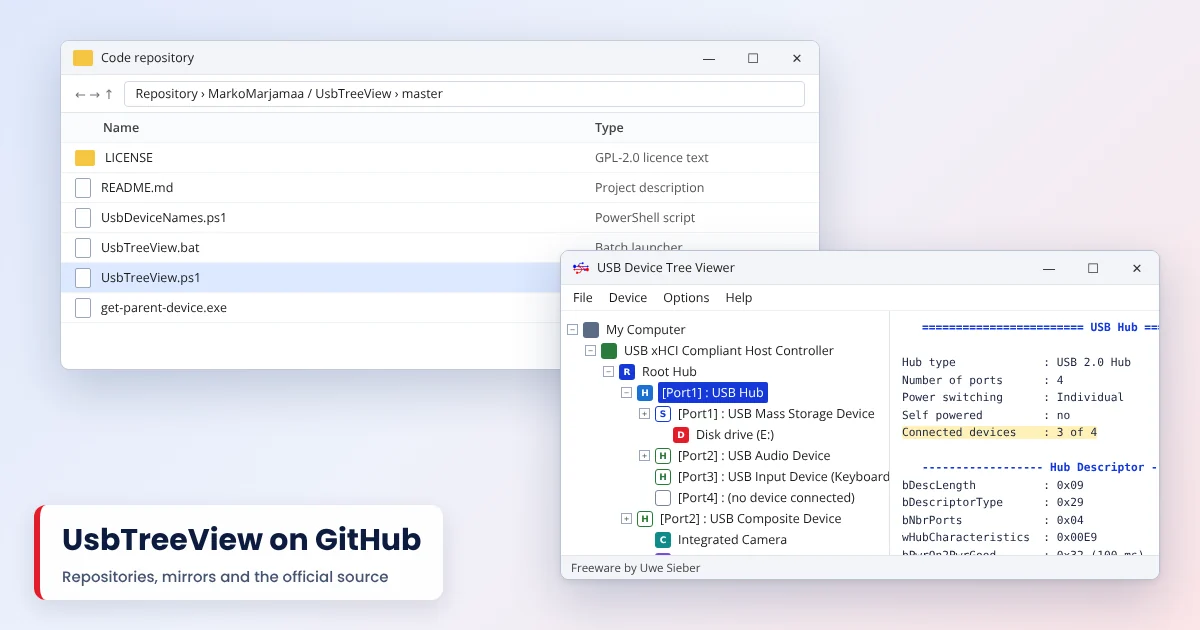
UsbTreeView GitHub searches usually start with a simple goal: finding a trustworthy copy of the USB device tree viewer in the place developers expect software to live. The answer is less obvious than it seems, because the well-known UsbTreeView by Uwe Sieber is not published as a GitHub project, while a different repository with the same name does exist there.
Where the Official UsbTreeView Lives
Uwe Sieber distributes USB Device Tree Viewer from his personal website, uwe-sieber.de, where each release appears as a ZIP archive for x64, Win32 and ARM64 editions of Windows. The same page carries the licence terms, a feature overview and a link to a version history that reaches back to the very first public build.
Keeping distribution on one site lets the author control exactly which files people receive. The freeware licence reinforces that approach: it allows wide use, including commercial work, yet it does not permit modified files or delivery through downloader programs, so the author's page remains the reference copy.
The MarkoMarjamaa UsbTreeView Repository
A public repository at github.com/MarkoMarjamaa/UsbTreeView uses the same name but is a separate project. Its description promises a user-friendly view of USB devices and the hubs they sit on, and it is built from PowerShell and batch scripts rather than a compiled Windows program.
What the Repository Contains
UsbTreeView.ps1, the main PowerShell script that builds the device listingUsbTreeView.bat, a small launcher that starts the scriptUsbDeviceNames.ps1, an additional PowerShell helper scriptget-parent-device.exe, compiled from the mkielar/get-parent-device project, with its own licence file- A GPL-2.0
LICENSEfile and a short README
How It Differs from Uwe Sieber's Tool
The script project focuses on presenting device names together with their parent hubs in a readable form. It does not claim to decode descriptors, report negotiated speeds or provide the safe removal and port restart actions found in the compiled viewer, and it has no packaged releases.
Comparing the Two Projects
| Aspect | USB Device Tree Viewer (Uwe Sieber) | UsbTreeView repository (MarkoMarjamaa) |
|---|---|---|
| Distribution | ZIP archives on uwe-sieber.de | Git repository on GitHub |
| Technology | Compiled Windows application | PowerShell and batch scripts |
| Licence | Freeware with published terms | GPL-2.0 open source |
| Builds | x64, Win32 and ARM64 | Source files, no packaged builds |
| USB detail | Descriptors, speed, power, port status | Device names and hub relationships |
| Change log | Detailed version history | Commit history |
The table makes the practical split clear. One is a mature diagnostic program with years of releases, while the other is a compact script that people can read, adapt and share under an open-source licence.
Why People Look for UsbTreeView on GitHub
GitHub has become the default place to check source code, report issues and follow updates, so many users assume every developer tool lives there. Searching for the program name naturally surfaces the repository above, and some download pages even point to it, which explains much of the confusion between the two projects.
Others look for source code because UsbTreeView descends from Microsoft's USBView sample. Microsoft does publish USBView among its Windows driver samples on GitHub, but that code is the original sample application rather than Uwe Sieber's much-extended viewer.
Mirrors, Re-uploads and Third-Party Copies
Copies of UsbTreeView.exe sometimes appear in other people's repositories, bundled inside driver kits or larger tool collections. These may be old builds, and there is no simple way to confirm they match the author's files. Because the licence rules out modified versions, an altered copy is both a technical risk and a licensing problem.
- Compare the version in the window title with the newest entry on the history page
- Prefer the ZIP from uwe-sieber.de over any re-hosted executable
- Scan every archive with your security software before running it
- Avoid repositories that ask you to run extra installers or download managers
Checking a Copy You Already Have
Open the program and look at the title bar or the Help menu to read the exact version number. If it lags several releases behind the history page, replacing it with a fresh download takes less than a minute and brings every bug fix since that build.
A file that arrived through an unfamiliar repository deserves extra care. Delete it, download the matching ZIP from the author's site and keep that archive as your clean reference for future installs on other machines.
Choosing the Right Option
Use Uwe Sieber's viewer when you need complete USB diagnostics: descriptor decoding, speed comparison, power data, drive letters, COM ports and XML reports. It is a single executable that needs nothing beyond Windows itself, and new versions arrive several times a year.
The PowerShell repository suits people who prefer readable scripts they can inspect and adapt under GPL-2.0, or who only need a quick list of devices grouped by hub. Reviewing scripts before running them is good practice, especially on work machines with PowerShell execution policies in place.
Licence Differences in Practice
GPL-2.0 lets anyone study, change and redistribute the PowerShell scripts, provided changes stay under the same licence. That freedom suits people who want to adapt the device listing for their own inventory scripts or internal reports.
UsbTreeView's freeware terms work differently. You may use the program anywhere, include it in products and share the original archives, but the files themselves must stay unmodified, which keeps every copy identical to the author's release.
Frequently Asked Questions
Is UsbTreeView open source?
Uwe Sieber's USB Device Tree Viewer is freeware rather than an open-source project, and its source code is not published on GitHub. The separate MarkoMarjamaa repository is open source under the GPL-2.0 licence.
Can I download UsbTreeView releases from GitHub?
The MarkoMarjamaa repository lists no packaged releases, so you clone it or download its code as a ZIP. Uwe Sieber's compiled builds for every Windows architecture are offered on his own website.
Is Microsoft USBView source available on GitHub?
Yes, Microsoft includes USBView in its Windows driver samples repository. That code is the starting point UsbTreeView grew from, not UsbTreeView itself, and it lacks the many additions Uwe Sieber has made since.
Conclusion
UsbTreeView GitHub results point to two different things: a small GPL-2.0 PowerShell project and, indirectly, the Microsoft USBView sample that inspired the original viewer. For the full-featured USB Device Tree Viewer, the author's website remains the dependable source, with clear licence terms and a documented release history.