
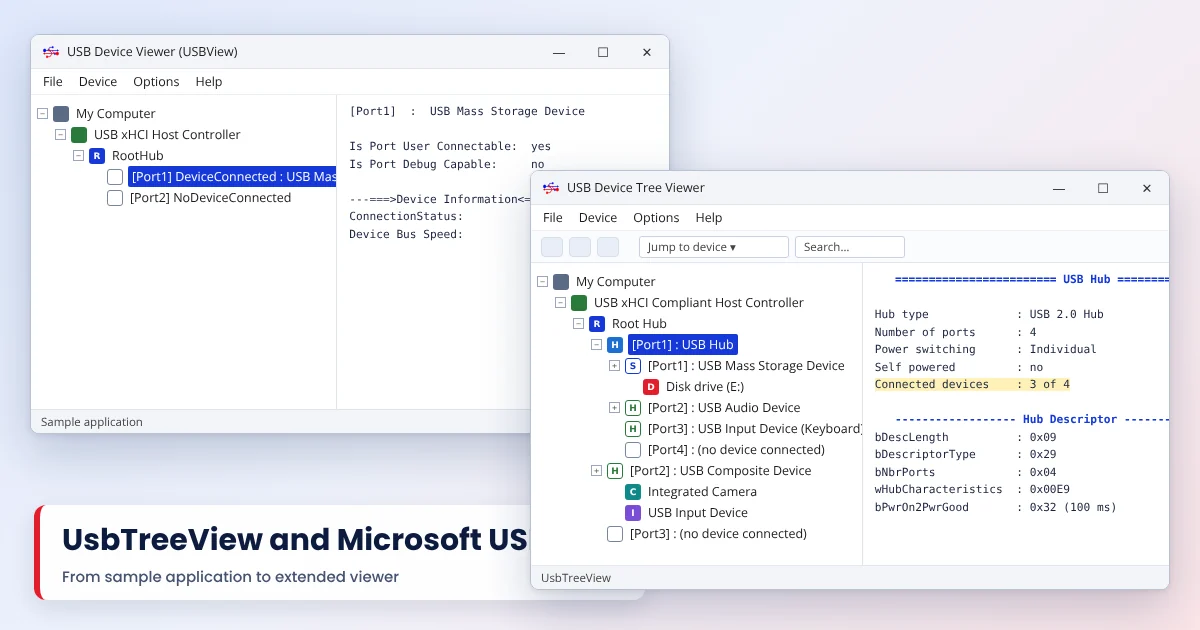
UsbTreeView Microsoft connections go back to USBView, a sample application that Microsoft created to show driver developers how to query USB controllers and devices. Uwe Sieber took that sample as his starting point years ago, and the two programs have since grown into quite different tools.
What Microsoft USBView Is
USBView is a small Windows program that browses USB host controllers, hubs and attached devices and displays their descriptors. Microsoft created it as sample code, demonstrating the calls a driver developer needs to enumerate the USB tree and read information from each device.
The tool is still available today. Microsoft includes USBView with the Debugging Tools for Windows, and its source code sits among the Windows driver samples on GitHub, where developers can study it or build it themselves.
How UsbTreeView Grew from USBView
Uwe Sieber began with the USBView source code from the Driver Development Kit for Windows Server 2003. His first changes were practical ones, such as remembering the window position, followed by a major addition: matching USB devices with information from Windows device management.
That matching lets UsbTreeView show child devices directly in the tree, including drive letters, volume names and COM ports. Later releases folded in the extended USB information that newer USBView samples obtain on Windows 8 and above, alongside many decoders the sample never had.
Key Differences at a Glance
| Aspect | Microsoft USBView | UsbTreeView |
|---|---|---|
| Purpose | Sample code for developers | Full diagnostic viewer |
| Maintainer | Microsoft | Uwe Sieber |
| Child devices | Not shown | Drive letters, volumes, COM ports |
| Device actions | Viewing only | Safe removal, device and port restart |
| Navigation | Basic tree | Search and jump lists |
| Reports | Own text and XML format | XML reports, not compatible with USBView |
| Distribution | Debugging Tools for Windows, GitHub source | Freeware ZIP archives |
Where USBView Still Makes Sense
Driver developers often prefer USBView precisely because it is sample code. Reading its source alongside the running program shows exactly which requests produce which fields, which is invaluable when writing or debugging a USB driver.
It also suits environments that only allow Microsoft-supplied tooling. If a lab already installs the Debugging Tools for Windows, USBView arrives with them and needs no separate approval.
Where UsbTreeView Pulls Ahead
For day-to-day diagnosis, the additions in UsbTreeView save real time. Seeing a drive letter or COM port next to the physical port removes guesswork, and the extra decoders turn raw bytes into readable values for many device classes.
- Child devices such as disk volumes and serial ports shown inside the tree
- Decoders for audio, MIDI, video, HID, Billboard and other descriptors
- Port chains and, from version 4.8.0, custom port names
- Safe removal, device restart and port restart from the context menu
- Search, jump lists, high-DPI support and a dark mode option
Is UsbTreeView a Microsoft Product?
No. UsbTreeView is developed and published by Uwe Sieber. It builds on Microsoft sample code, which is why the names sound alike, but it is not a Microsoft release and is not distributed through Microsoft channels.
The distinction matters when you look for updates. Microsoft updates USBView through its SDK and samples repository, while UsbTreeView updates appear on Uwe Sieber's website with a detailed history for each version.
Choosing Between the Two
Pick USBView when you are learning how USB enumeration works at the code level, or when policy limits you to Microsoft tools. Its output is accurate, and the source code is a teaching resource in its own right.
Pick UsbTreeView when the goal is to understand a real machine quickly: which port a device uses, how fast it is connected, what it draws from the bus and which drive letter or COM port belongs to it.
Reading the Same Device in Both Tools
Opening the same flash drive in both programs is an instructive exercise. Both show the device descriptor, configuration descriptor and connection information, because both ask Windows the same underlying questions about the device.
The differences appear around those core values. UsbTreeView adds the drive letter, volume name, port chain and plain-language summaries, while USBView presents the raw results more directly, which mirrors their respective roles as diagnostic tool and teaching sample.
How Updates Reach Each Tool
USBView changes when Microsoft updates its samples and debugging tools, typically alongside new Windows SDK and driver kit releases. Those updates focus on supporting new USB features in the sample code rather than on convenience features.
UsbTreeView follows its own schedule, with several releases most years. The developer's history page records each fix and addition in detail, from new descriptor decoders to small interface refinements, so you can see exactly what changed between versions.
Which Tool Suits Which User
Different people get the most from different tools. The list below summarises the practical fit for each group, based on what the two programs actually offer.
- Driver developers studying enumeration code: USBView with its source
- Support technicians diagnosing user devices: UsbTreeView
- PC builders mapping motherboard ports: UsbTreeView with port names
- Students learning how USB descriptors are structured: both, side by side
Many people end up keeping both programs. USBView answers questions about how the data is requested, while UsbTreeView answers questions about what a particular machine is doing right now, and together they cover almost every USB investigation.
Frequently Asked Questions
Can USBView and UsbTreeView run on the same PC?
Yes. Both are standalone viewers, so they can sit side by side on the same machine. Running them together is a handy way to compare readings when you are learning the meaning of particular fields.
Do UsbTreeView reports open in USBView?
No. UsbTreeView can save and load XML reports, but the developer notes that its format is not compatible with the XML produced by USBView.
Where can I get Microsoft USBView?
It is included with the Debugging Tools for Windows, part of the Windows SDK and driver kit downloads. You can also build it from the source in Microsoft's Windows driver samples repository.
Conclusion
UsbTreeView Microsoft heritage explains its familiar layout, but years of additions have turned the USBView sample into a far more practical everyday viewer. Developers still benefit from USBView's readable source, while technicians and curious users get more answers, faster, from UsbTreeView.